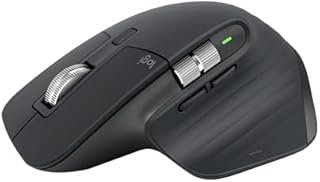
Logitech MX Master 3S Review 2026: The Best Productivity Mouse, Period

Logitech MX Master 3S Mouse

EDITOR’S PICK

Logitech MX Master 3S Mouse Review 2026

8,000 DPI. Silent Clicks. MagSpeed Scroll. This Is What a Mouse Should Be.

9.6/10 — Editor’s Score
$79.99$99.99Save $20

Check Price on Amazon →

The Mouse That Ruins Every Other Mouse

After using the MX Master 3S for a week, every other mouse feels broken. The MagSpeed electromagnetic scroll wheel alone is worth the price. The moment-to-moment feel of clicking, scrolling, and navigating is so refined that switching back to a standard mouse creates genuine frustration. This is the productivity tool that pays for itself in reduced daily friction within days.

MagSpeed Electromagnetic Scroll Wheel

The signature feature of the MX Master line. The scroll wheel switches between two modes automatically: precise tactile scrolling for line-by-line control, and frictionless free-spin that can scroll 1,000 lines in one second for long documents and web pages. The switch happens automatically based on scroll speed — flick it fast and it spins freely; scroll slowly and it clicks precisely. Once you use this, you cannot go back.

8,000 DPI — Works on Any Surface Including Glass

The 3S upgrades from the MX Master 3’s 4,000 DPI to 8,000 DPI with Logitech’s new Darkfield sensor. It works on virtually any surface — including glass tables where most mice fail completely. The cursor precision at any sensitivity setting is flawless, making it equally useful for detailed design work and fast navigation.

Silent Clicks — 90% Quieter

The 3S adds silent primary buttons — 90% quieter than standard clicks according to Logitech’s testing. In open offices, libraries, or late-night work sessions, this is more useful than it sounds. The clicks still feel satisfying and tactile — they’re not mushy like some silent mice — they’re just quiet.

Multi-Device + Logi Options+ Software

The MX Master 3S connects to up to 3 devices simultaneously (via Logi Bolt USB receiver or Bluetooth) and switches between them with a button under the mouse. Logi Options+ software lets you customize every button, create app-specific profiles, and set up flows to drag files between computers. For power users with multiple machines, this feature alone makes the mouse irreplaceable.

Key Highlights

  • 8,000 DPI Darkfield sensor — works on glass
  • MagSpeed electromagnetic scroll wheel
  • Silent primary clicks — 90% quieter
  • Up to 3 device simultaneous connection
  • 70-day battery on a single charge
  • USB-C fast charging (1 min = 3 hours)
  • Thumb wheel for horizontal scrolling
  • App-specific profiles via Logi Options+

✅ Pros

  • MagSpeed scroll wheel is genuinely transformative
  • Works on any surface including glass
  • Silent clicks without mushy feel
  • 70-day battery — charge once a month
  • USB-C fast charging
  • Multi-device switching (up to 3 devices)
  • Ergonomic shape suits all-day use

❌ Cons

  • Large — right-handed only design
  • No RGB lighting (minimalist aesthetic)
  • Premium price vs basic mice
  • Bluetooth connection can lag vs Logi Bolt receiver

Final Verdict

The Logitech MX Master 3S at $79.99 is the best productivity mouse available. If you spend 4+ hours a day at a computer, the MagSpeed scroll wheel and 8,000 DPI Darkfield sensor will meaningfully improve your daily work quality. The silent clicks and multi-device switching are bonuses that make it even more compelling. An investment that pays for itself immediately.

$79.99$99.99Save $20 — Limited Deal

View on Amazon →

As an Amazon Associate we earn from qualifying purchases. Price verified at time of writing — always check Amazon for current pricing.

Leave a Comment

Your email address will not be published. Required fields are marked *

Scroll to Top